Made for shops in Oman · English · العربية · বাংলা

Billing software & Point of Sale for your shop

Fast barcode billing, VAT invoices, WhatsApp bills, a due book that reminds your customers, stock, branches and reports — on the shop computer, on your phone and online.

Windows PC & POS terminals Android phones Online shop panel
3languages
80mm · 58mm · A4receipts & invoices
Offlinekeeps selling, syncs later
Create your shop account

The same email and password then work in the GPOS apps
Already have an account? Sign in
Billing screen: scan, tap or search products — cash, card or due in one key
Who can use GPOS

One billing software for every kind of shop

Supermarket, mobile shop, computer shop, clothing or any other business that sells — GPOS fits the way you work.

Supermarkets & grocery

Fast barcode billing, stock and expiry dates, offers and the due book.

Mobile phone shops

Sell phones and accessories, take repairs, buy used phones with the seller’s ID.

Computer & electronics shops

Quotations, A4 VAT invoices, repair and service jobs, supplier purchases.

Clothing, saree & fashion

Barcode stickers, quick billing, returns and exchanges, loyalty points.

Perfume, cosmetics & gifts

Products in English and Arabic, nice receipts with your logo, WhatsApp bills.

Pharmacies & medical stores

Expiry dates, stock alerts, supplier bills and daily reports.

Cafés, bakeries & takeaway

Touch-screen quick buttons, customer display and QR code orders.

Hardware, building & paint

Quotations, credit sales with pay-by dates and big A4 invoices.

Repair & service shops

Receive items with a slip and barcode, follow every job until it is ready.

Stationery, books & toys

Thousands of items with barcodes, labels, stock and purchase records.

Wholesale & distributors

Customer dues, supplier payments, branches and staff logins.

Vegetables, meat & fish

Quick price buttons, cash or due, and the day’s sales on your phone.

Your business is not in the list?
Any shop that sells items or services can use GPOS — on a Windows computer, an Android phone or online. Each kind of shop sees only the options it needs.
Ask us
Everything in one system

All the tools a shop needs, from the till to the owner’s phone

Tap a card to see the real screens and what each part does.

Billing

Bill a customer in seconds

One clear screen for the cashier: products on the left, the bill in the middle, payment on the right. It works the same with a USB barcode scanner, a mouse or a touch screen.

  • Scan barcodes or tap quick product buttons; search by name or code
  • Change quantity or price, add a note to any line (e.g. 1 year warranty, gift wrap)
  • Cash with quick notes (1 · 5 · 10 · 20 · 50 OMR) and automatic change
  • Keyboard shortcuts: F1 cash, F2 card, F3 due, F8 sales
  • VAT 5% calculated on every line; prints a tax invoice at once
  • Compact layout for 1024×768 POS terminals with on-screen keyboard
Billing screen
Receipts & WhatsApp

Beautiful receipts — printed or on WhatsApp

Design your receipt once and every sale prints the same way. Send the bill to the customer’s WhatsApp as a PDF, straight from the till.

  • Receipt designer with live preview: 80mm, 58mm or A4 tax invoice
  • Your logo, shop name in English and Arabic, VATIN, CR number, header and footer lines
  • Invoice barcode on every receipt — scan it later for returns or reprints
  • WhatsApp bill: the PDF invoice is attached to the customer’s chat automatically
  • A4 invoices in Modern, Classic or Bold style with your colour and font
  • Quotations: scan the items, add the customer’s name and phone, and send the price offer as a PDF on WhatsApp
Receipt with WhatsApp send
Due book

Sell on credit — and get paid on time

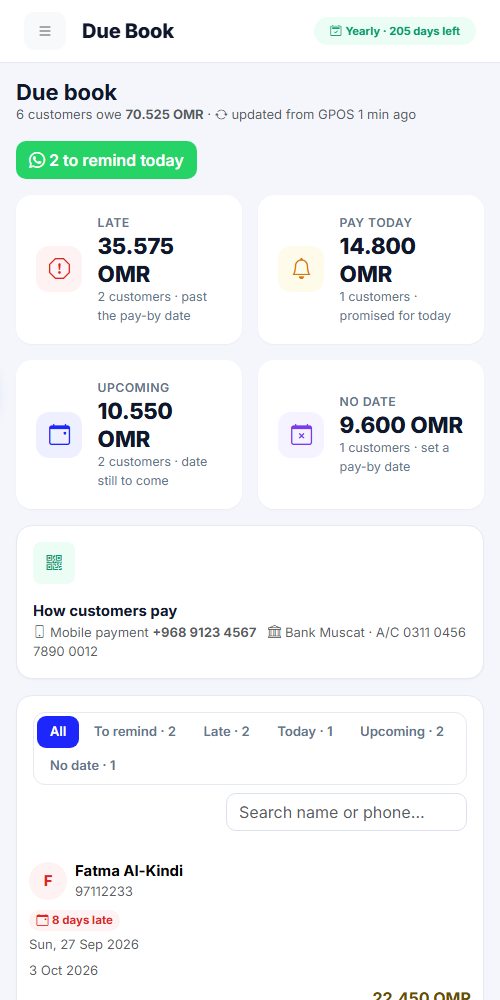
Write the bill to the customer’s due book with a pay-by date. On that day GPOS reminds you, and one tap sends the customer a polite WhatsApp reminder with how to pay.

  • Sell on due by phone number; new customers are created automatically
  • Take a part payment now, the rest goes to the due book
  • Choose the pay-by date (3 days, 1 week, 1 month or any day)
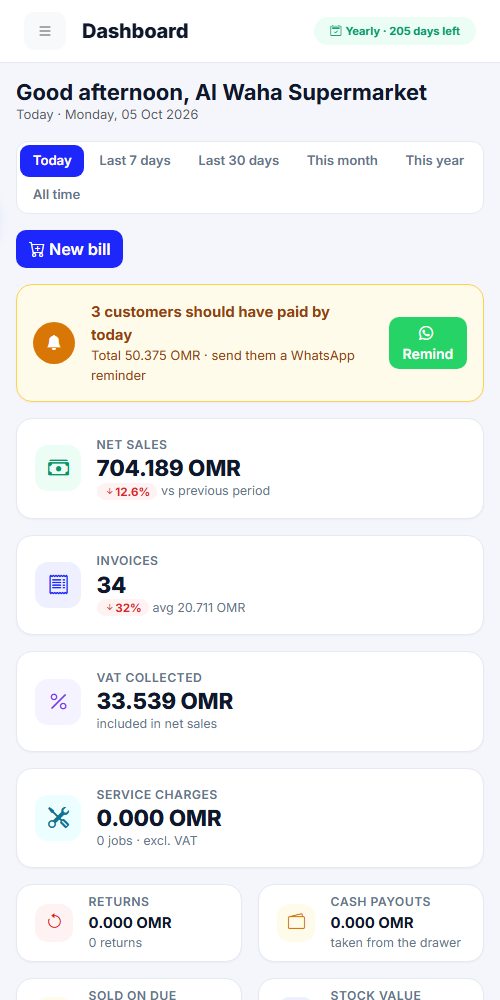
  • Dashboard reminder: “2 customers should pay today” with a WhatsApp button
  • Reminder includes the amount, the date and your payment number / bank / QR code
  • Due statement PDF for every customer; late, today and upcoming at a glance
  • Also on the website: see who owes, set dates and remind from your phone
Due book with pay-by dates
Customers

Know your customers, reward them

Keep every customer with their phone number. Loyalty points are earned on each purchase and can be used as a discount on the next bill.

  • Find customers by name or phone; add a new one in seconds
  • Loyalty points earned automatically, redeemed at the till
  • Customer name and phone printed on the receipt and used for WhatsApp
  • Each customer’s due history: sales, payments and returns
Customers and loyalty points
Returns

Returns without mistakes

Scan the barcode on the receipt, choose what comes back, and GPOS does the rest: stock goes back, the money is refunded or taken off the customer’s due.

  • Find the sale by scanning the receipt or typing the invoice number
  • Return part of a bill; GPOS never allows more than was sold
  • Refund from the cash drawer or take it off the due
  • Admin PIN required, with the reason recorded
Return items from an invoice
Cash & services

Every riyal in the drawer is explained

Payouts and service work are recorded separately from sales, so the end-of-day cash always matches.

  • Cash payouts (supplier, expenses) with reason and admin PIN
  • Service charges for repairs and labour — mobile, computer, printer…
  • Expected cash in drawer = cash sales + due collected − payouts − refunds
  • Service jobs report as PDF
Cash payout
Inventory

Stock that is always right

Every sale, return and purchase updates the stock. Products have English and Arabic names, their own VAT, a cost price and expiry dates.

  • Products with barcode, English & Arabic name, category, cost and selling price
  • Manufacture and expiry dates with warnings before products expire
  • Unknown barcode? Its name is suggested from the GPOS shared barcode list
  • Import and export the whole list with CSV (Excel)
  • Low-stock and soon-to-expire lists on the online dashboard
Inventory
Purchases & suppliers

Buy stock, pay suppliers, know what you owe

Scan the goods as they arrive and the stock is updated in one go. Pay the supplier now or later — GPOS keeps every supplier’s account, and the owner sees it on the website too.

  • Supplier, bill number and items scanned with the barcode scanner
  • Pay now from the cash drawer (counted as a payout) or from the bank / owner
  • Not paid in full? The rest is kept as owed to the supplier
  • Suppliers list: bought, paid and what you still owe each one — pay part or all later
  • Every bill and payment on the website: Suppliers page with items and history
  • Purchase PDF with paid and still-owed amounts
What you owe each supplier
Barcode labels

Print your own price stickers

Choose products, choose the label size and print barcode stickers with name and price on any label printer.

  • Many label sizes (e.g. 50×30, 40×25, 38×25 mm)
  • Show or hide the price and the shop name
  • Live label preview before printing
Barcode labels
Reports

Clear numbers for the owner

See today, the last days, the month or the year: sales, invoices, VAT, returns, payouts, dues and the cash that should be in the drawer.

  • Filter by period and by branch
  • Search any invoice by number, product, amount, date or cashier — and reprint it
  • Due summary: sold on due, collected, still owed
  • Export to PDF and CSV
Sales & reports
Branches & staff

Many branches, one owner

Each branch logs in with its own email and PIN, and its sales stay separate. Cashiers get their own PIN; sensitive actions need the admin.

  • Branches with their own login, address and phone
  • Staff users with roles (cashier, manager) and 4-digit PINs
  • Admin approval for price changes, returns and payouts
  • Owner sees all branches together or one by one
Branches
Hardware

Works with your shop equipment

GPOS talks directly to thermal printers, the cash drawer and customer displays.

  • USB or network thermal printers (80mm / 58mm) and normal A4 printers
  • Cash drawer opens on cash sales
  • Second screen customer display showing the order and total
  • Small pole display (VFD / LED) on a COM port
Printer settings
Invoice designs

Invoices that look like your brand

Pick a design once — every printed bill, PDF and WhatsApp invoice uses it, on the shop computer and on the phone. Your logo is printed faintly behind the invoice.

  • Receipt roll (80 / 58 mm): Classic, Bold, Compact and Boxed designs
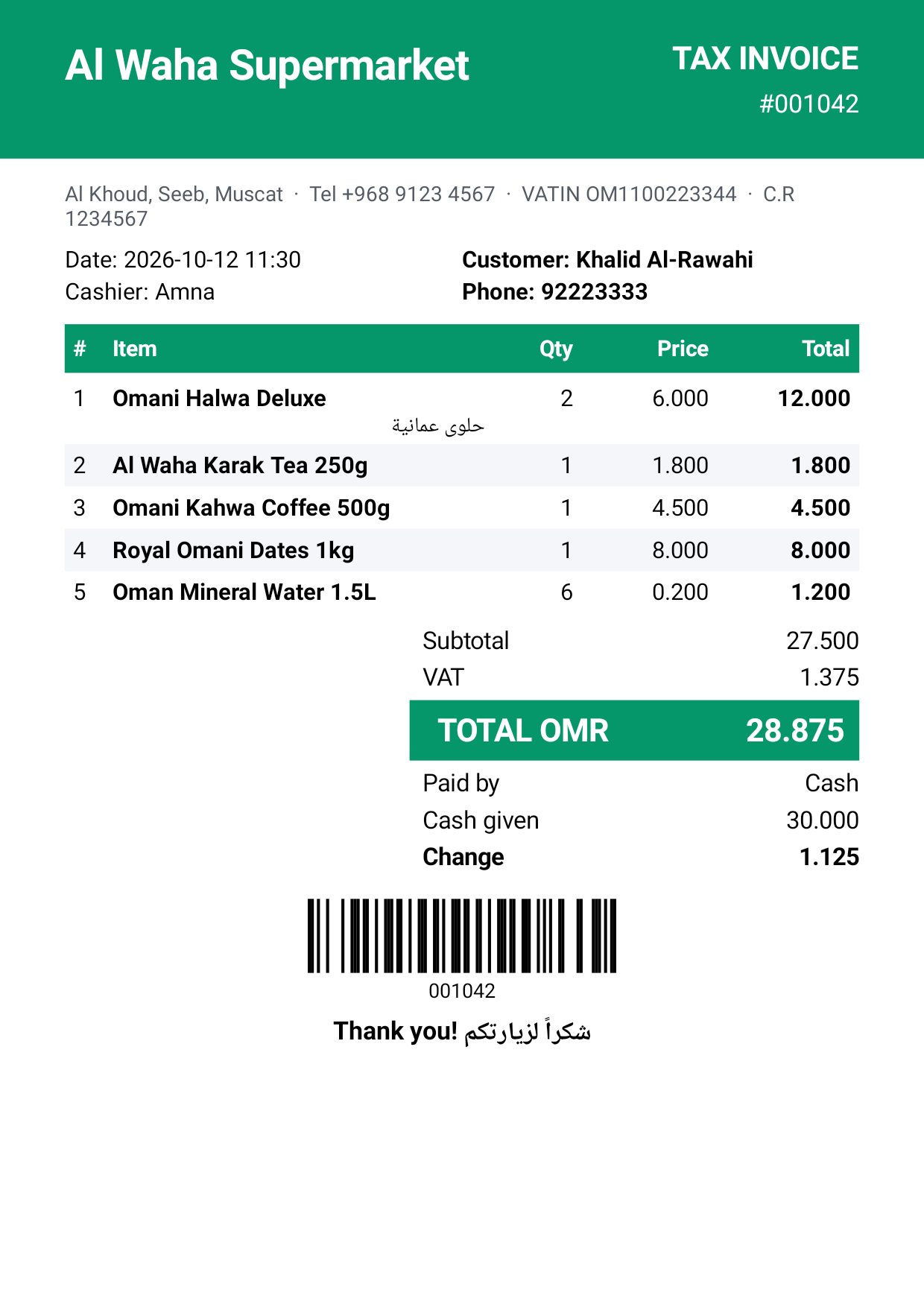
  • A5 and A4 pages: Modern, Classic, Bold, Minimal and Elegant, with page borders and fonts
  • Any colour you like — or the same colour as the app
  • Your logo faintly in the background of A4 / A5 invoices
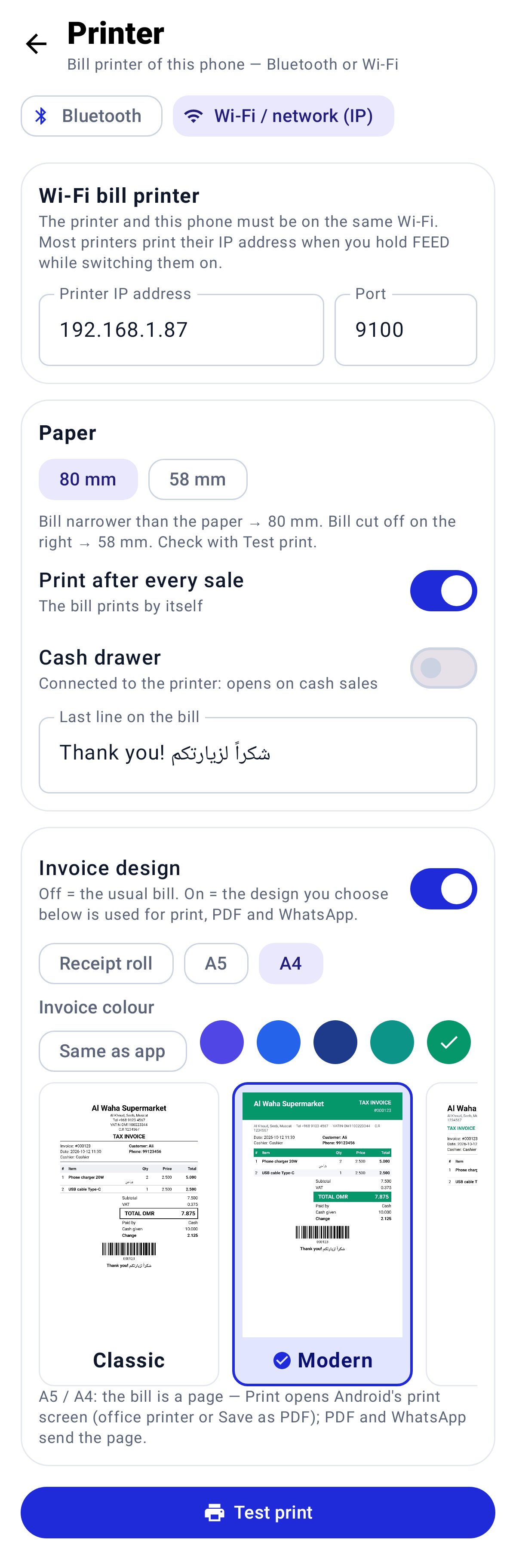
  • On the phone: choose the design and the colour in Menu → Printer, with a live picture of each design
  • Phone bills print on a Bluetooth or Wi-Fi receipt printer, or as an A4 / A5 PDF
A4 Modern — your colour and logo
Look & feel

Light, night — in your own colour

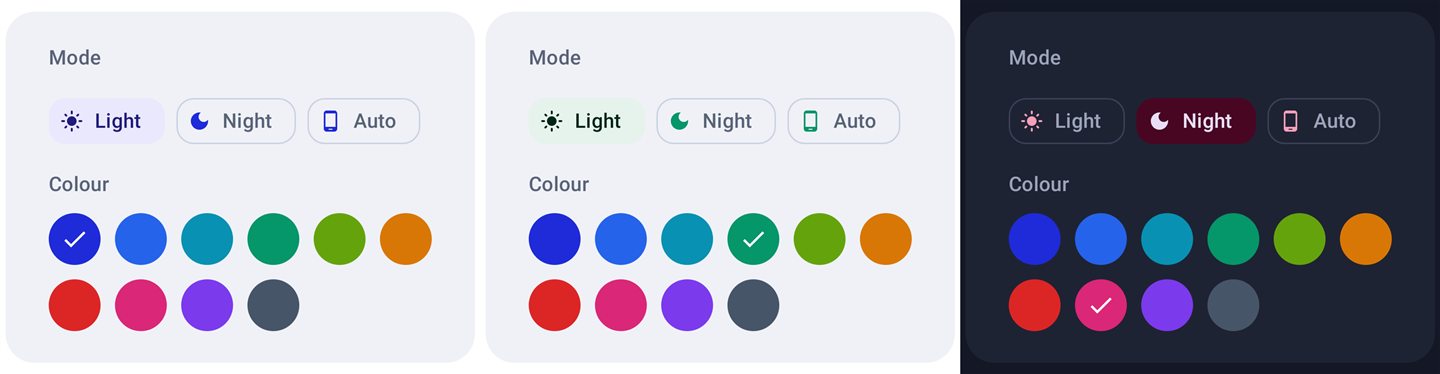
One tap at the top of the screen changes the whole app: light or night mode, and the main colour you like best. Your shop logo sits softly in the background so every screen feels like your own.

  • Light, night or the same as the computer
  • 9 main colours on the computer, 10 on the phone — blue, green, red, pink, purple…
  • Invoices can use the same colour (one switch)
  • Logo in the background of every screen and of A4 / A5 invoices
  • On the phone: a colour button on the Home screen — the choice is remembered
The colour menu at the top of the screen
Offers & QR orders

Offer posters that bring orders

Pick the items, choose the discount and GPOS draws a ready poster with your logo, prices and the last day. Print it, post it on WhatsApp Status, or send it to your customers one by one. A QR code on the poster opens your own order page — customers choose items and order, and you are told at once.

  • Pick items (or scan them), apply −10 / −15 / −20 / −25% or type each offer price
  • Upload an item photo with one tap — it shows on the poster
  • 3 designs (Big sale, Clean grid, Eid / Ramadan) in Post and WhatsApp Status sizes, English + Arabic title
  • A QR code “Scan to order” on every poster opens your order page: offers first, then all your other items
  • The order arrives in GPOS with a ringtone you choose; reply to the customer on WhatsApp in one tap
  • Offer prices work at the till on the days of the offer, and the poster prints on A4 for the shop window
Big sale poster with a QR code
Service & repairs

Receive an item, give a slip, follow the job

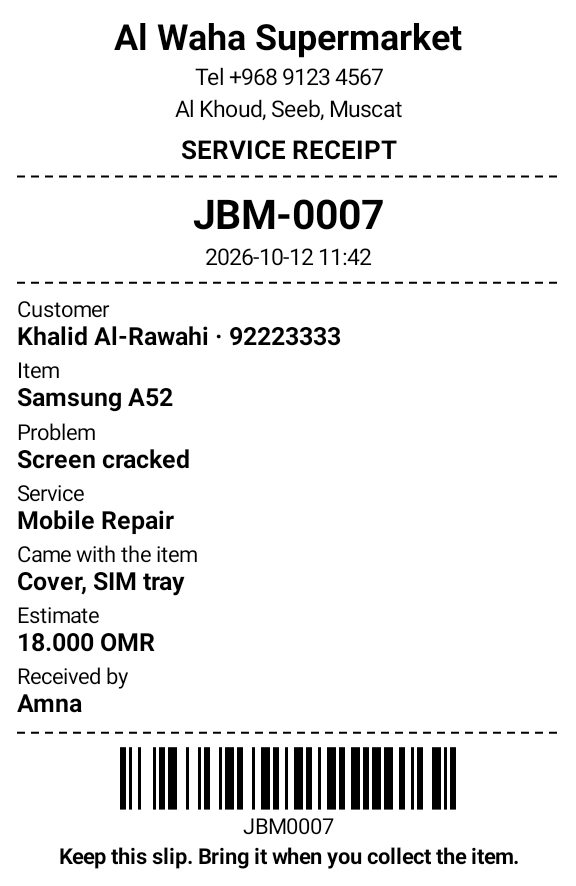
For mobile, computer and printer repair shops: write down what came in, with photos, and give the customer a slip with a job number and barcode. Scan the barcode later to open the job and make the bill.

  • Receive on the computer or on the phone — phone jobs appear on the computer within seconds
  • The customer slip prints at once on the phone’s printer or on the shop computer’s printer
  • Item, problem, service type, estimate, what came with it (bag, charger…) and photos
  • Steps: Received → Pending → Ready → Delivered (or Returned) — and a WhatsApp message to the customer at each step
  • Item sticker with the job barcode on your label printer
Service & Repairs on the computer
IP cameras

A picture of every paid order, in your e-mail

Connect your shop camera and GPOS takes a picture the moment an order is paid, then e-mails it to you with the bill number, the cashier, the items and the total. The cash drawer and printing are never delayed.

  • Works with Hikvision and Dahua cameras — only the IP, user and password are needed
  • “Find cameras on my network” finds the camera by itself; you type only the password
  • Press Test to see a picture at once
  • No internet? The order waits and the e-mail goes out later
  • Locked with the admin password
Settings → IP Cameras
Languages

English, العربية and বাংলা

Every screen is available in English, Arabic (right-to-left) and Bengali. Each cashier can switch with one tap; receipts can show English and Arabic together.

  • Full Arabic right-to-left layout
  • Bengali for staff who prefer it
  • Products and shop name in English and Arabic
Arabic
Online shop panel · g.npos.vip

Your shop, from anywhere

Sign in on this website with your GPOS email. Everything the shop computer sells appears here, and changes you make here go back to the shop computer within a minute.

Dashboard: sales, invoices, VAT, payments and best sellers
Shop panel on a phone
Dashboard on your phone
Due book on a phone
Due book on your phone
Android app

GPOS in your pocket

The GPOS Android app signs in with the same email and password. Check the shop, make a sale or change a price from your phone.

  • Live dashboard: today’s sales, invoices and payment methods
  • Sell from the phone (cash, card or due) — the shop computer takes the sale
  • Sales list, products, prices and stock
  • Admins can switch between all their shops
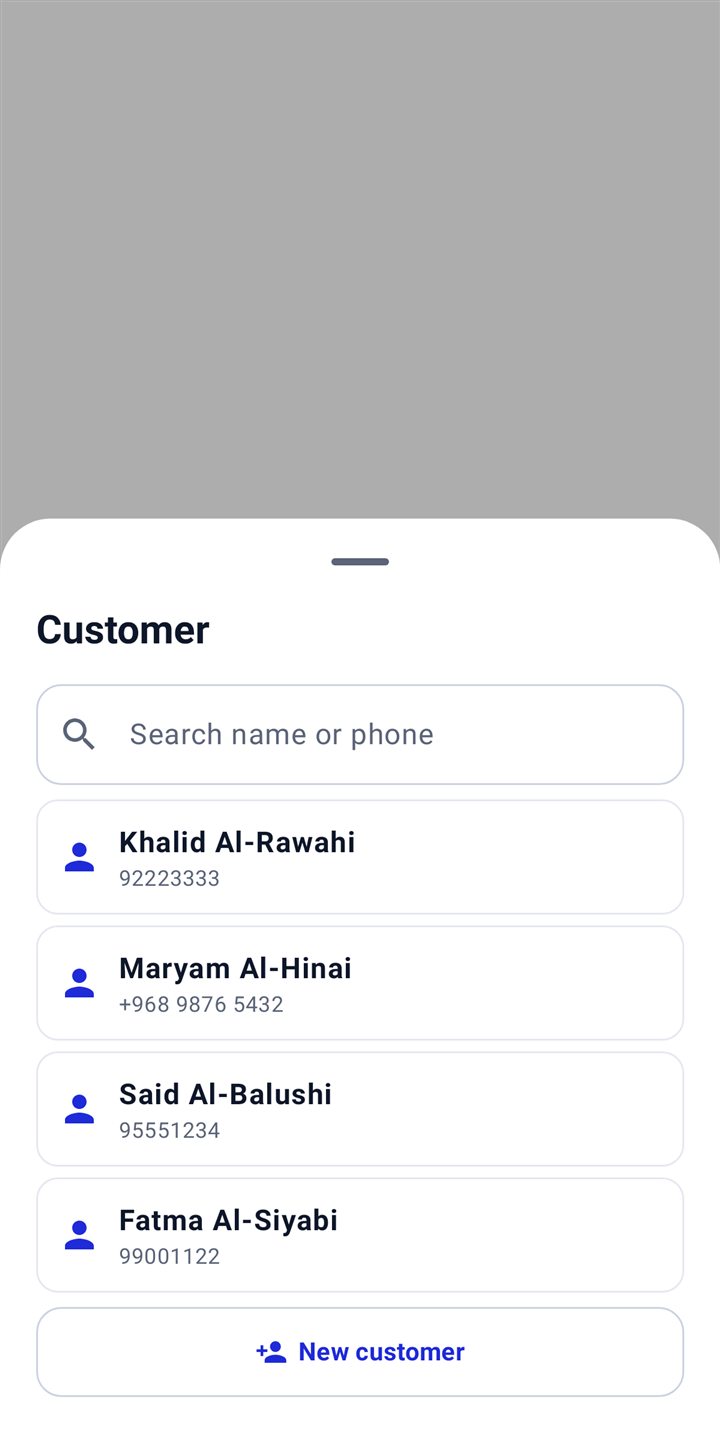
  • Choose the customer from your list (search by name or phone) or add a new one while billing
  • Print bills on a Bluetooth or Wi-Fi printer, or as an A4 / A5 PDF in your invoice design
  • Receive service items with photos — the slip prints at once
  • Light or night mode and your own colour
GPOS for Android
Version 1.6.17 · 23.5 MB
Download APK
Choose or add a customer
Invoice design and colour
An A4 bill as PDF
An A4 bill as PDF
The service slip
The service slip
Light, night and colours
Safe & always up to date

It keeps working — even without internet

Works offline

Sales never stop. When the internet is back, everything is sent to the panel automatically.

Two-way sync

Sales, products and dues match on the shop computer, the website and the phone.

Verified computers

A new computer must be verified with the owner password and an email code.

Automatic updates

GPOS tells you when a new version is ready and installs it in one click.

Packages

Simple packages for every shop

Start with a free trial. Pay monthly or yearly — upgrade any time.

Basic

Billing for a small shop
Ask for the price
  • Barcode billing, VAT invoices, stock & sales reports
  • Due book & reminders
  • WhatsApp bills
  • Barcode labels
  • Shop expenses
  • Profit & loss reports
  • Purchases & suppliers
  • AI bill reading
  • Quotations
  • Service & repairs
  • Buy used items
  • Customer screen
  • Bluetooth printers
  • Network printers
  • COM port printers
  • Weighing scale
  • Offers & posters
  • Branches
  • Staff attendance
  • Mobile app
  • Barcode billing & VAT invoices
  • Stock & products
  • Daily sales reports
Start your 30-day free trial

How to pay

PayPal (card or PayPal account)
Mobile banking transfer
96121555
MOHAMMAD NASIR UDDIN
QR
After paying, sign in and send the screenshot of the payment (Settings → Subscription) — your GPOS is renewed as soon as it is confirmed.

Download GPOS

Install on the shop computer and on your phone. Create your account once — the same login works everywhere. 30 days free.

Download GPOS
Windows (PC / POS terminal)
Version 1.9.33 · 144 MB
Download
Windows 7 (older computers)
Version 1.9.27 · 144.3 MB
Download
Android (mobile & tablet)
Version 1.6.17 · 23.5 MB
Download
Questions

Billing software questions

What is GPOS billing software?

GPOS is billing and point of sale (POS) software for shops in Oman: fast barcode billing, VAT invoices, WhatsApp bills, a due book, stock, suppliers, quotations and reports — on a Windows computer, an Android phone and online.

Is GPOS free to try?

Yes. Every new shop gets a free trial with all features. Create an account on this page, download GPOS and start billing in minutes.

Does the billing software work without internet?

Yes. GPOS keeps billing offline on the shop computer and sends everything to your online panel when the internet is back.

Can I make VAT invoices and send bills on WhatsApp?

Yes. GPOS prints 80mm, 58mm or A4 tax invoices with VAT and sends the bill or a quotation to the customer’s WhatsApp as a PDF.

Which shops can use GPOS?

Supermarkets and grocery shops, mobile phone shops, computer and electronics shops, clothing and saree shops, perfume and gift shops, pharmacies, cafés, hardware stores, repair shops, wholesalers and any other shop that sells items or services.

Can a mobile or computer shop use GPOS?

Yes. Mobile and computer shops sell with barcodes, make quotations and A4 VAT invoices, take repair and service jobs with a slip, and can buy used phones with the seller’s ID.

Which languages does GPOS support?

English, Arabic and Bengali — on the shop computer, the phone app and this website.

Ready to run your shop with GPOS?

Questions, setup help or a subscription: Nasir Group · +968 96121555